

Micro-Frontends: What They Are and Why You Should Use Them
Published on January 19, 2026
In this continuing hackathon coverage article, we explore how the team is progressing in building an AI-powered travel agent app using micro-frontends, Module Federation, and other modern tools!
About The Hackathon
This hackathon, hosted by Shashi Lo’s Gridiron Survivor apprenticeship program, brings together developers for a fast-paced challenge: building an AI-powered travel app entirely from scratch. Taking place in the first quarter of 2026, two rival teams are competing, with each group working on their own unique project. The event offers not only prizes, but also a great opportunity to build skills, collaborate in a real-world setting, and share progress with the community. While there’s a competitive edge, the main focus is on learning, teamwork, and gaining hands-on development experience.
To follow our journey, ask questions, and share your feedback in real time, subscribe to the Coding with Shashi YouTube channel and turn on notifications to stay updated on all the latest events.
Hackathon/Gridiron Survivor Team Members:
- Alex Appleget
- Cody Epstein
- Hector Suazo
- Will Cooley
- Dominic J. Monaco
- Jennifer Tieu
- David Terzano
- Michael Larocca
- Tony Briely
- Aman Lokhande
- Bradley Diep
- Parys G Khazaie
- Kerilne Moncy
- Calypso Hernandez MFA CSM
- Jeremy Fischer
- Mike Chen
- Nicktaylor
- Shashi Lo
What Are Micro-Frontends
Micro-frontends are a way of building a large website by breaking it into smaller, independent sections—each one like its own mini-app, often managed by different teams. Instead of everyone working in one giant codebase, each section focuses on a specific feature, such as search, a shopping cart, or your profile. Teams can build, update, and deploy their own part without waiting for everyone else, using the tools and frameworks they prefer. When you visit the site, a main app brings all these pieces together, so everything feels like one smooth, unified website.
Why Use Micro-Frontends
Why use micro-frontends? As websites grow more complex, it becomes harder for teams to work together in the same codebase without things getting overwhelming. Micro-frontends make it easy to split up the work so teams can focus on just their part of the site. This means updates and new features can go live faster, since teams aren’t waiting on each other. It’s also easier to find and fix problems because everything is broken down into smaller, more manageable pieces. Plus, teams get the freedom to choose the best tools for their section, making everyone’s job simpler and more enjoyable. In the end, micro-frontends help teams move quickly, stay organized, and keep big websites running smoothly.
What Is Module Federation
Module Federation is a tool that lets different parts of a website—like micro-frontends—share code and features with each other, even if they’re built and deployed separately. Think of it like connecting LEGO sets: each team can build their own section of the site, but Module Federation makes it possible to snap those pieces together and even share special bricks (like buttons or menus) without having to copy them everywhere.
With Module Federation, teams can update or add features to their section without affecting the rest of the site. It also means they can use the same tools or libraries just once, instead of loading multiple copies—keeping things fast and efficient. For micro-frontends, this is a game-changer: it allows true independence for teams, while still making sure everything works together smoothly for users. In short, Module Federation is the magic that helps all the mini-apps "talk" to each other and play nicely as one big app.
Personal Reflection
Micro-frontends and Module Federation work together to let teams build complex apps in a smarter, more flexible way. For our hackathon project, this meant we could split our travel app into separate sections—each with its own team and features—while still keeping everything connected. Module Federation was the glue that let us share code and release updates independently, without breaking the rest of the app.
Getting hands-on with these tools during the hackathon showed me just how practical and powerful this approach is. Here’s what I discovered:
At first, I did not grasp the concept or understand the benefits of a micro-frontend—it just sounded like standard React to me, where components can be worked on separately by team members. The “Team Champs” divided their TripWeave app into three parts: Pre-Trip, Itinerary, and During Trip, and each part is set up as a micro-frontend.
With this micro-frontend approach, each part of the app can be worked on independently, without launching the entire app. This allows for a streamlined development process that benefits the team as a whole. For example, the “During Trip” part of the app—an AI-powered travel assistant—is being worked on independently and can even be launched on its own, without having to launch the entire app.
Micro-frontends also let teams share things like components or helper functions, so you don’t have to copy and paste the same code everywhere. This helps keep things simple and follows the “Don’t Repeat Yourself” (DRY) principle. The Module Federation tool works alongside micro-frontends to make this kind of sharing possible, so teams can work independently and still use each other's code when needed.
Here are a few more things I learned along the way:
- Incremental Adoption: You don’t have to switch to micro-frontends all at once—just add them piece by piece.
- Independent Releases: Teams can deploy updates to their micro-frontend whenever they’re ready, without waiting for the entire app to be finished.
- Consistent User Experience: It’s important for the entire team to work together on things like design and navigation, so the app still feels seamless for users, even though different teams built different parts.
Overall, learning about micro-frontends opened my eyes to new ways teams can build better apps together. This was my first experience working with micro-frontends, and although it was admittedly a bit challenging to grasp and set up, I now see the value and benefits they bring to team-based projects.
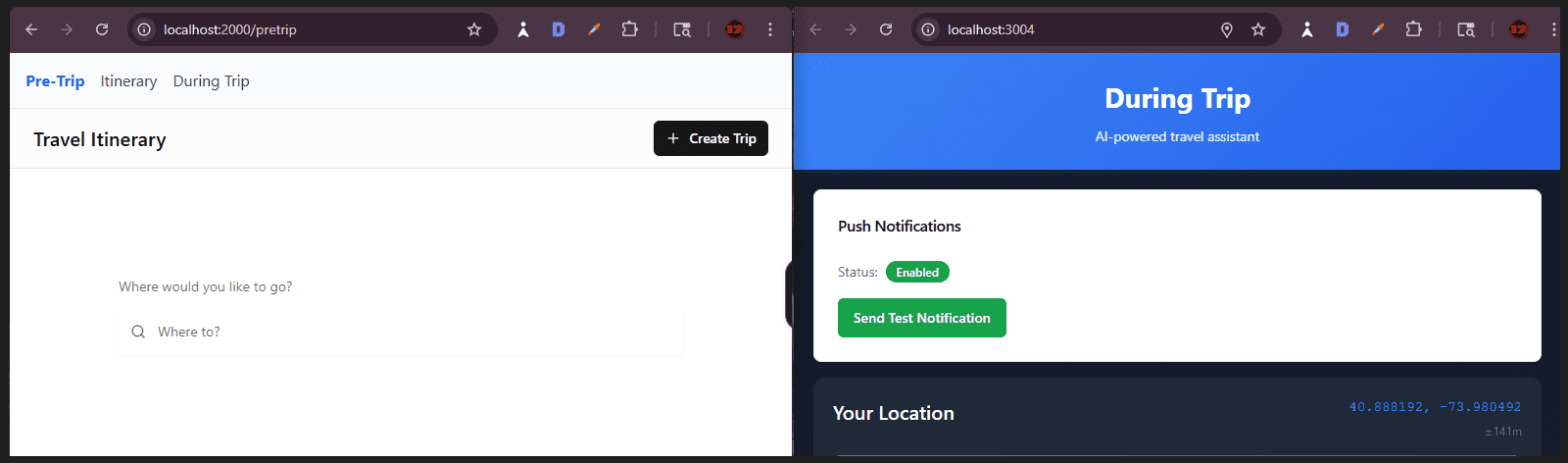
Team Champs TripWeave app in progress
How We Use Micro-Frontends in the Hackathon
For the Trip-Weave hackathon project, as previously mentioned, one team of 10 members took on the challenge of building the app. This team was further divided into smaller groups, with each group responsible for one section: Pre-Trip, Itinerary, or During Trip (with a few senior members supporting all three micro-frontends). This setup made it much easier for the groups to build, test, and update their section independently, without worrying about breaking the rest of the app.
To organize and connect all the pieces, the team used a tool called Rsbuild. Rsbuild is a super-fast build tool—think of it as a high-speed publisher for your app—that turns code into something the browser can use. Each micro-frontend had its own setup, so groups could work independently and development was much faster. The main app, called the "shell," could then pull in each micro-frontend on demand, similar to plugging in different game cartridges. Rsbuild was chosen because it's fast, supports sharing key libraries like React as singletons (so only one copy runs at a time), and works well with the team's deployment setup.
To help everything work smoothly together, Module Federation was also used. This allowed the team to share code and features between sections, so there was no need to copy and paste the same things everywhere. Zephyr (one of this Hackathon’s sponsors) was also brought in to help automatically check and share code safely between the groups, making collaboration even easier. Zephyr is a platform and set of tools that helps deploy, manage, and connect micro-frontends in the cloud. It also helps generate TypeScript types for shared code, making sure everything fits together and reducing mistakes. In addition, Zephyr was used to deploy the app to the cloud, streamlining the launch process for the entire team.
Gridiron Survivor Hackathon & Zephyr Cloud
This video introduces the Gridiron Survivor’s Hackathon, sponsored by Zephyr Cloud, with a focus on AI and building specialized agents. Zach Chapel, CEO and co-founder of Zephyr Cloud, discusses the launch of Zephyr Agency—a platform designed to create powerful, purpose-driven AI agents that go beyond generic tools.
Highlights from the video:
- Specialized AI Agents: The benefits of building agents with specific skills and human-like attributes, making them more effective than generalist AIs.
- Hackathon Project Ideas: Potential projects include travel agents or websites using these specialized agents to provide tailored experiences.
- Micro-Frontends & Module Federation: How breaking apps into smaller, independent pieces lets teams work faster and deliver a seamless user experience. Zephyr Cloud streamlines this process with efficient deployment tools.
- Junior Developers & AI: The value of junior developers who are eager to learn and adopt new AI technologies, often adapting faster than more experienced developers.
Watch the video to learn more about how AI and modern web development tools are shaping the future of collaborative projects!
Further Learning
For an in-depth dive into Micro-Frontends, check out Jack Herrington’s excellent freeCodeCamp YouTube course: Micro Frontends Course – Beginner to Expert
This course covers foundational concepts and advanced techniques, making it a great resource for both beginners and experienced devs!
Gridiron Survivor Sponsors
A very special thanks to our sponsors!
- GitKraken: A popular Git client that provides a graphical interface to manage Git repositories. It is known for its user-friendly design and features that simplify version control, making it easier for developers to collaborate and manage their code.
- Frontend Mentor: An online platform that offers front-end coding challenges. It helps developers improve their skills by providing real-world projects to work on and a supportive community for feedback and learning.
- Zephyr Cloud: A Module Federation platform that accelerates micro-frontend development by providing instant deployment, intelligent dependency resolution, and seamless version management—all while remaining cloud agnostic, framework agnostic, and bundler agnostic.
My other related articles
- Bridging the Skills Gap: Empowering Junior Developers Through Apprenticeship Programs
- Hackathon Highlights: Building and Livestreaming an AI Travel Agent
- Software Versioning: A Developer's Guide to Semantic and GitHub Releases
- Creating Cohesive Design Systems with Atomic Design Principles
- Sprint Workflow: A Beginner's Guide to Agile Development

Be sure to listen to the HTML All The Things Podcast!
📝 I also write articles for the HTML All The Things Podcast, which you can read on their website: https://www.htmlallthethings.com/.
Be sure to check out HTML All The Things on socials!
I’m excited to announce that I’m now a Torc Ambassador! As part of this global community, I’ll be sharing valuable insights from Torc’s virtual events, lessons from my own tech journey, and real-world perspectives on how teams are hiring and working today. I’ll be active in the Torc community through posts, events, Q&A sessions, and more—so stay tuned for updates and opportunities to connect. Whether you’re looking to advance your tech career or simply stay informed, I hope the insights I share will support and inspire you on your journey!
Torc is an AI-powered platform and vibrant global network that connects skilled professionals with top opportunities and forward-thinking companies. If you’re interested in joining, you can create a free profile using my referral link: https://platform.torc.dev/#/r/b5QZ7k5h/cp
Affiliate & Discount Links!

With CodeMonkey, learning can be all fun and games! CodeMonkey transforms education into an engaging experience, enabling children to evolve from tech consumers to creators. Use CodeMonkey's FREE trial to unlock the incredible potential of young tech creators!
With a structured learning path tailored for various age groups, kids progress from block coding to more advanced topics like data science and artificial intelligence, using languages such as CoffeeScript and Python. The platform includes features for parents and teachers to track progress, making integrating coding into home and classroom settings easy.
Through fun games, hands-on projects, and community interaction, CodeMonkey helps young learners build teamwork skills and receive recognition for their achievements. It fosters a love for coding and prepares children for future career opportunities in an ever-evolving tech landscape.
To learn more about CodeMonkey, you can read my detailed review article!
Affiliate Links:

Advance your career with a 20% discount on Scrimba Pro using this affiliate link!
Become a hireable developer with Scrimba Pro! Discover a world of coding knowledge with full access to all courses, hands-on projects, and a vibrant community. You can read my article to learn more about my exceptional experiences with Scrimba and how it helps many become confident, well-prepared web developers!
Important: This discount is for new accounts only. If a higher discount is currently available, it will be applied automatically.
How to Claim Your Discount:
- Click the link to explore the new Scrimba 2.0.
- Create a new account.
- Upgrade to Pro; the 20% discount will automatically apply.
Disclosure: This article contains affiliate links. I will earn a commission from any purchases made through these links at no extra cost to you. Your support helps me continue creating valuable content. Thank you!
Conclusion
Instead of building one giant website, micro-frontends let teams split the project into smaller, independent sections, almost like mini-apps. Each team can focus on specific features and work in parallel. This approach makes big projects easier to manage, speeds up updates, and helps teams avoid stepping on each other’s toes. It also allows for more flexibility and a smoother user experience.
Module Federation is the secret sauce that lets these separate parts share code and work together seamlessly, even if they’re built and deployed independently.
Working hands-on with micro-frontends and Module Federation during the hackathon changed the way I think about building apps. I saw firsthand how these tools help teams collaborate, experiment, and release updates faster, all while keeping everything organized and connected. Whether you’re building a big project with a team or just curious about new ways to structure your apps, these tools are definitely worth a look!
Let’s connect! I’m active on LinkedIn and Twitter.

Are you now curious about building apps with micro-frontends and Module Federation? Are you considering using these tools in your next project? Please share the article and comment!
Please share it!